 BACK UP GAMINGAccount
Welcome back.
Sign in for your dashboard, cashback balance, and referrals.
No account yet? Create one
Choose a new password
Support reset the password for your website account. Enter the temporary password you were given, then choose your own new password to continue.
Create your account.
Optional, always — for cashback, referrals, and your saved wallet. Top-ups never require an account.
Already have an account? Log in
Home
Choose a game and top up
Top up instantly as a guest, or sign in to unlock cashback and referral rewards.
Choose a Game to Top Up
Adds balance to your game account.
Tap any game to top up as a guest — no account needed.
My Game Accounts
Game Links
Need the game? Open it here. Already have the game? You can skip this section.
Earned automatically on eligible top-ups. Nothing moves until you tap Claim.
Invite friends and earn on their deposits.
The minimum and maximum you can cash out depend on what you deposited. These are the current rules.
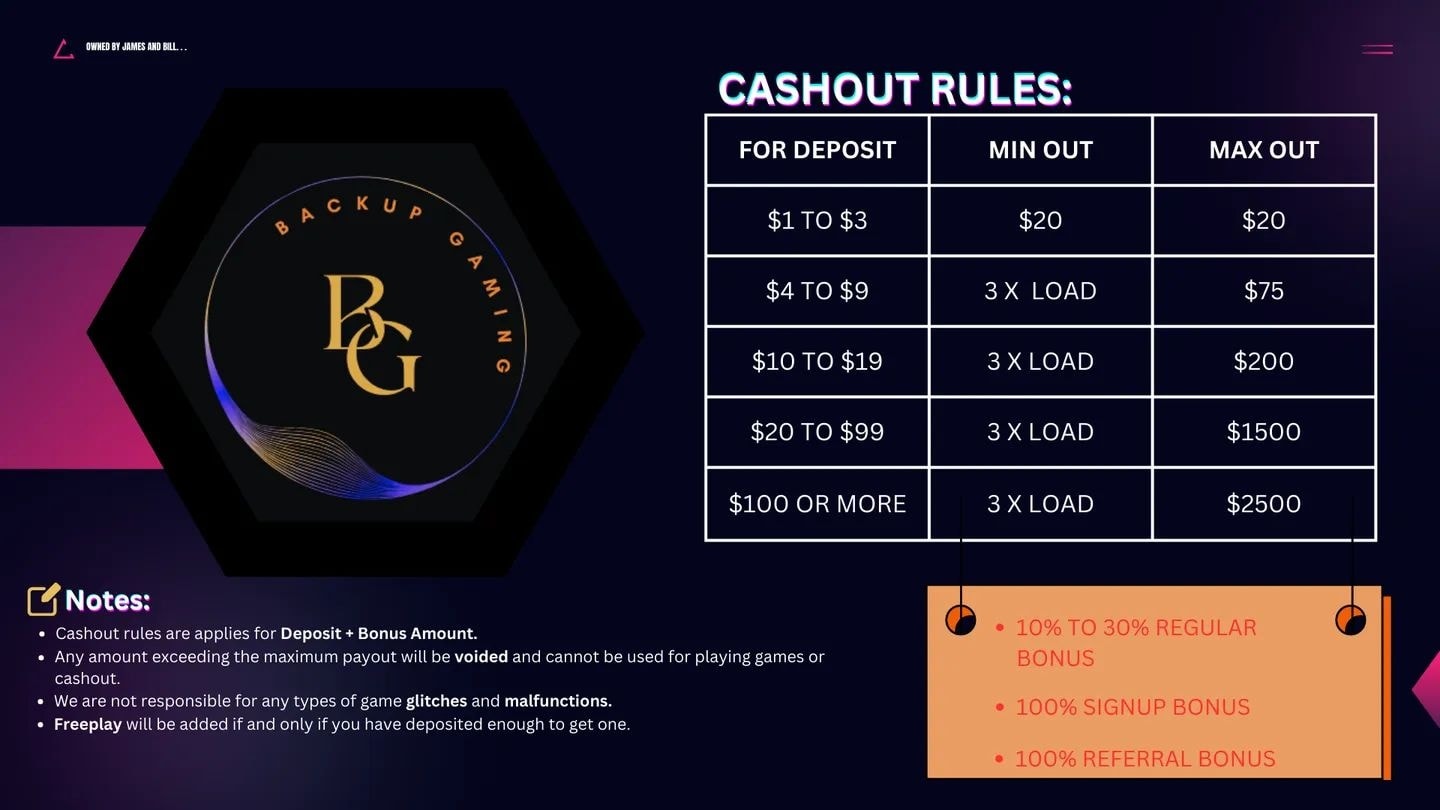
Request a payout from any game account saved to your profile. A supervisor opens the game, checks the balance and removes the points by hand before anything is paid.
Hidden accounts
These are hidden from your Home. Restoring one brings it back — nothing was deleted.
Tier Benefits
Completed deposits increase your lifetime volume, which sets your tier.
Profile
—
A confirmed address lets you reset your password by email if you ever forget it. It is separate from promotional email.
Confirm your email address, then we'll take you straight to creating your game account.
Service messages about your orders and account are always sent. Promotional messages are only sent if you choose to receive them.
Occasional offers by email, only if you say yes here. You can turn this off any time. Separate from the general promotional-messages choice above.
Off unless you allow it. Lets us see which campaigns bring people here using an anonymous daily visit marker kept for 90 days. Never required to sign up or pay, and separate from promotional messages.
Add a game account
Save your username so topping up takes one tap. You don't need to have topped up before — it's marked Verified automatically once a top-up completes.
My game accounts
Your linked game accounts, and what you can do with each one from here.
Recent requests
Create game account
Choose a game, a username and a password. The account is created under your profile and linked to it automatically.
For your security, confirm your account password first.
Reset game password
—
For your security, confirm your account password first.
Wallet
This is where your cashback and referral rewards are paid.
History
Your completed top-ups.
We're here to help.
Message a supervisor directly — replies usually come within a few minutes, and your conversation history is kept.
Chat on this website
Message our support team securely through your GameVault account.
Message our Facebook Page directly. Fastest way to reach us outside the website.
Message us on FacebookFacebook conversations are managed separately and will not appear in your GameVault support history.
Messenger
Prefer Facebook Messenger? Open a separate conversation with our Facebook Page.
Message us on MessengerMessenger conversations are managed separately and will not appear in your GameVault support history.
Choosing a game account helps support find your details faster.
Notifications are best effort and are not guaranteed to arrive. Your Support badge and conversation are always up to date when you open the site again.
Report a Concern
Privately report a concern about a support interaction. Only BACK UP GAMING admins can see this — not the Supervisor or support agent involved.